

JanitorAI
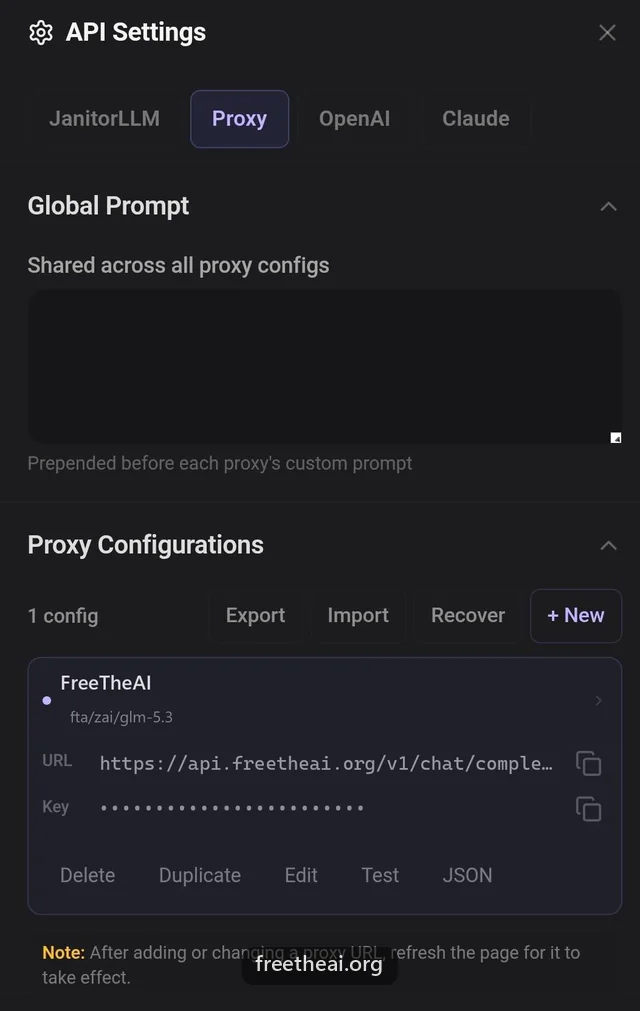
JanitorAI connects to FreeTheAI through its Proxy settings. You paste the full chat completions URL, your key, and a model ID, then refresh the page.
Category: Roleplay apps. Before you start, you need a FreeTheAI account, an API key, and today's check-in.
Settings
| Setting | Value |
|---|---|
| Configuration Name | FreeTheAI |
| Model Name | fta/zai/glm-5.3 |
| Proxy URL | https://api.freetheai.org/v1/chat/completions |
| API Key | Your FreeTheAI key (ftai_..., 53 characters) |
Steps
Open a chat
Open any character and start a chat. The character must allow proxies.
Open API Settings
Tap the menu (three lines) at the top right of the chat, then API Settings.
Add a proxy configuration
Choose Proxy, then + Add Configuration, and fill in the values from the table above. The Proxy URL must end in /chat/completions. Leave Custom Prompt empty for now.
Save and refresh
Press Save Settings, then refresh the page (Ctrl+Shift+R on a computer). JanitorAI only loads a new proxy after a full reload.
Check in and chat
Free models need one check-in a day at freetheai.org/checkin. Then send a message.
Tips
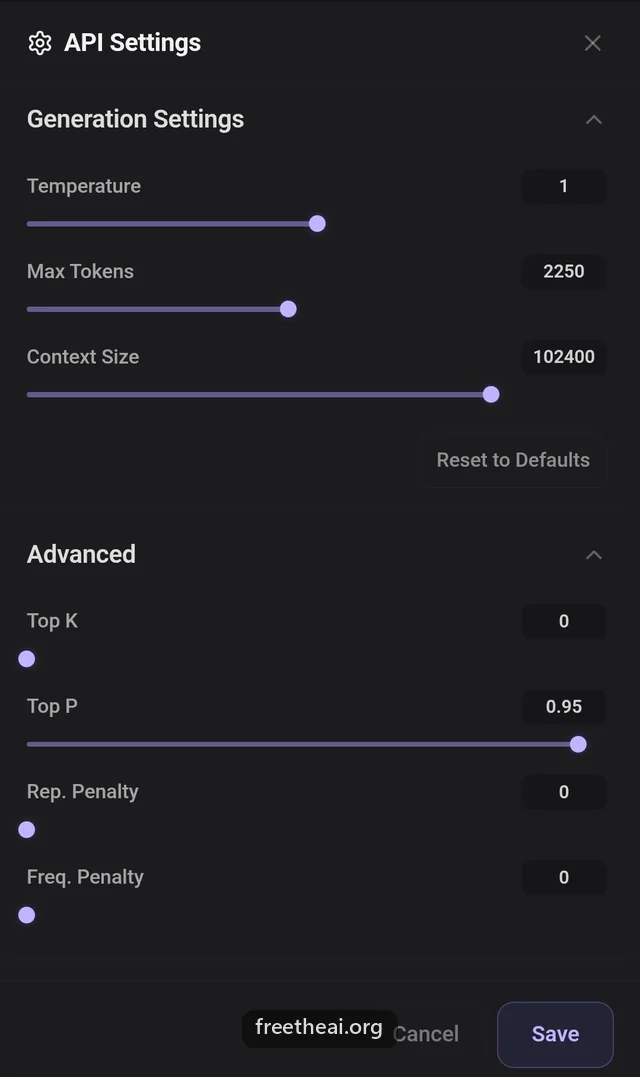
- Setting Max new tokens to 0 asks for the model's full output limit.
- Keep streaming on for long replies.
- Copy model IDs from freetheai.org/models. They always start with fta/.
Common questions
Why does JanitorAI say "network error" or "Failed to fetch"?
The Proxy URL is wrong or the page was not refreshed after saving. Use api.freetheai.org/v1/chat/completions exactly, save, and reload the page.
Why do I get a 401 error?
The key is wrong or incomplete. Paste the whole ftai_ key (53 characters). The short ftai_1234567... shown in your key list is only a prefix.
Which model is best for JanitorAI roleplay?
Start with fta/zai/glm-5.3. fta/kimi/k3 and fta/mmx/minimax-m3 are good alternatives. fta/dog/ and fta/lion/ models are for general chat and refuse roleplay. The full list is at freetheai.org/models.
It still says "Failed to fetch" with the right URL. What else can I try?
That error often comes from JanitorAI itself, mostly in the app. Use janitorai.com in a browser instead, and try turning off prefill and text streaming.
Why do I get a 403 error?
Free models need one check-in a day. Check in at freetheai.org/checkin, then try again.
Why do I get a 429 error?
Your previous reply is still being written. Wait for it to finish, then send again. Free models answer one request at a time per account.
The model is busy or the reply is empty. What should I do?
Reroll the message, or switch to another model. freetheai.org/status shows which models are up.
Why are replies cut off?
Raise Max new tokens in Generation Settings, or set it to 0 to ask for the model's full output.
Can I turn thinking off on JanitorAI?
JanitorAI has no thinking setting, but you can turn thinking off for your key: on freetheai.org/dashboard/api-keys, edit the key and switch on Turn thinking off.
How do I get longer or shorter replies?
Ask for it in your prompt, for example "Response length: about 300 words", and set Max new tokens high enough.
Does FreeTheAI work through Lorebary?
No. Connect JanitorAI to FreeTheAI directly with the Proxy URL above.
More help
How this guide was checked
Checked against JanitorAI's help center proxy guide and current setup guides on 2026-09-29.