

Zed
Zed adds FreeTheAI as an OpenAI compatible LLM provider for the agent panel.
Category: Coding tools. Before you start, you need a FreeTheAI account, an API key, and today's check-in.
Settings
| Setting | Value |
|---|---|
| Provider | OpenAI (compatible) |
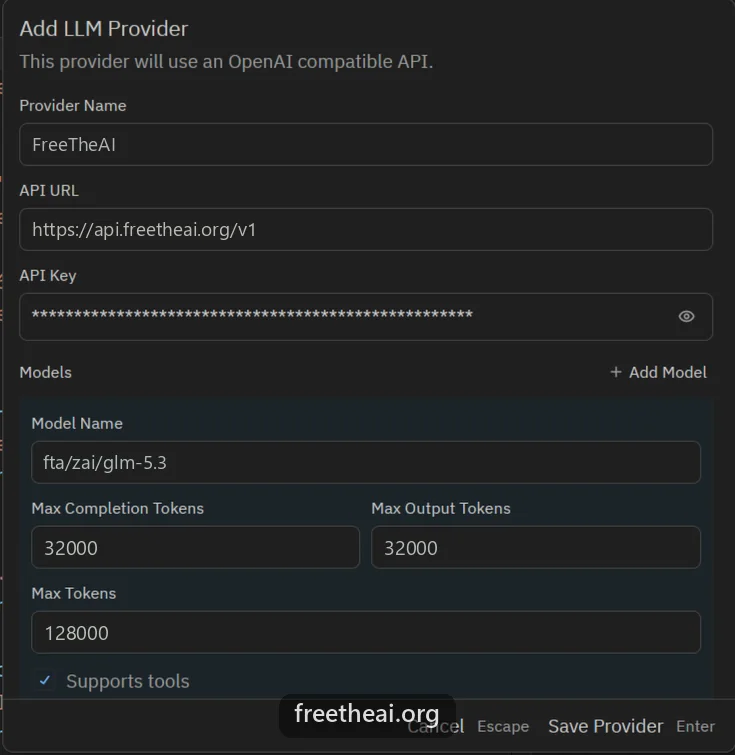
| API URL | https://api.freetheai.org/v1 |
| Model ID | fta/zai/glm-5.3 |
| API key | Your FreeTheAI key (ftai_..., 53 characters) |
Steps
Open Agent Settings
Press Ctrl+Shift+P (Cmd+Shift+P on Mac) and run agent: open settings.
Add the provider
Under LLM Providers press Add Provider, choose OpenAI, and enter the provider name, API URL, model ID, context window (for example 128000), and your key. Save.
Or use settings.json
The same provider in Zed's settings.json. Zed then reads the key from the FTAI_KEY environment variable, or from the key you saved in Agent Settings.
{
  "language_models": {
    "openai_compatible": {
      "FreeTheAI": {
        "api_url": "https://api.freetheai.org/v1",
        "available_models": [
          { "name": "fta/zai/glm-5.3", "display_name": "GLM 5.3", "max_tokens": 128000 }
        ]
      }
    }
  }
}
Common questions
Where is Add Provider in Zed?
Press Ctrl+Shift+P (Cmd+Shift+P on Mac) and run agent: open settings. Under LLM Providers press Add Provider, choose OpenAI under compatible APIs, fill it in, and press Save Provider.
I do not see an Add Provider button. Why?
Your Zed is out of date. Update it, or add the provider to settings.json as shown above.
Why do I get a 401 error?
The key is wrong or incomplete. Paste the whole ftai_ key (53 characters).
Why do I get a 403 error?
Free models need one check-in a day. Check in at freetheai.org/checkin, then try again.
The model is busy or the reply is empty. What should I do?
Try again, or switch to another model. freetheai.org/status shows which models are up.
More help
How this guide was checked
Checked against Zed's docs (OpenAI-compatible endpoints) on 2026-09-29.